How map selection affects a round
Learning a Flee the Facility map helps you find computers, reach captured teammates, and escape chases without running into dead ends. Start with recognizable landmarks and the passages connecting them. Knowing how to leave a room matters as much as knowing where that room is.
Maps are the locations where rounds take place. The Flee the Facility Wiki describes the following voting and spawning rules:
| Round stage | What happens |
|---|---|
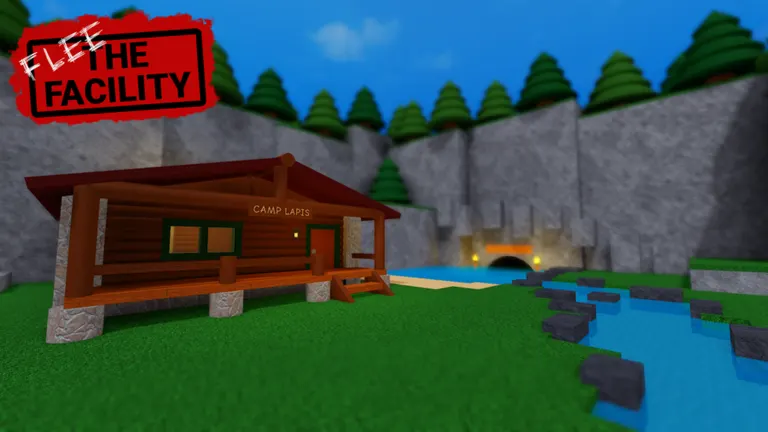
| Intermission | Players vote in the Camp Lapis lobby during a 30-second break. |
| Map choices | Four maps are offered for voting. |
| Selection | The map with the most votes wins. A tie favors the leftmost tied option. |
| Initial spawning | Survivors enter the map first. The Beast spends 15 seconds in the Beast Cave before entering. |
Use that head start to identify your surroundings, check a nearby computer location, and find another way out. A familiar room can become dangerous if you begin hacking before noticing that its only convenient exit leads toward the Beast.
Voting also gives you a practical learning opportunity. Repeated rounds on a familiar map help you connect isolated rooms into routes. Once those connections feel predictable, another map can broaden your options.
Recognizable landmarks across maps
The easiest landmarks to remember are visually distinct spaces: a basketball court, an airplane, a barn, or a large library room. They give teammates shared reference points and help you recover your bearings after a chase.
The landmark descriptions below follow the wiki’s map directory. The practice suggestions translate those features into navigation goals. This selection focuses on recognizable environments; voting choices and map versions can change.
| Map | Useful identifying features | What to practice |
|---|---|---|
| Homestead | Weathered houses, a barn, and a small hedge maze | Connecting buildings without losing your bearings |
| Airport | An airplane, airfield areas, restaurants, offices, and server rooms | Moving between distinct zones and floors |
| The Library | Two large library rooms spanning both floors, with smaller surrounding rooms | Recognizing which staircase reaches your destination |
| School | A basketball court, stage hall, classrooms, and bathrooms across two floors | Identifying dead ends before starting an objective |
| Arcade | Bright arcade rooms, neon details, and darker maintenance areas | Recognizing transitions between similar corridors |
| Arctic Station | A snowy outpost with outdoor sections and many climbable windows | Linking indoor routes with outdoor crossings |
| Sanctuary Zoo | Animal habitats, display buildings, and employee passageways | Remembering connections between distant areas |
| Spaceship | A two-story spacecraft with large open spaces and futuristic equipment | Tracking your floor and nearby connections |
School deserves particular attention when learning room entrances. The wiki describes several small classrooms with only one entrance. Before committing to a computer in a confined room, identify how early you would need to leave if the Beast approached.
Larger environments create a different problem: travel time. Recognizing a destination does not automatically mean you know a quick route there. On Airport or Sanctuary Zoo, practice moving between landmarks without checking every side room.
Vertical navigation needs separate attention. In The Library and Spaceship, remembering your floor prevents wasted detours. Build your mental route around both the destination and the connection that reaches its level.
Finding computers and planning rescues
A remembered computer location is a place to check. It does not guarantee an active computer in that round. The FTF Calculator map guide emphasizes this distinction and recommends learning maps through connected zones instead of treating an old diagram as a fixed objective checklist.
Use a short scouting routine:
- Identify your zone. Find a distinctive room, sign, building, or major connection before choosing a direction.
- Check nearby possibilities. Search a small cluster of likely computer rooms, then move toward another recognizable area if they are empty.
- Choose an escape route. Before hacking, locate a usable doorway, window, vent, or connection that leads somewhere you recognize.
- Remember useful progress. Keep track of computers you have worked on so that returning later does not require another full search.
- Reassess after a capture. Consider the route to the captured teammate, the Beast’s observed position, and your way out after the rescue.
For Survivors, map knowledge helps preserve choices. A route that breaks line of sight is more useful when you know where it ends. Running through an unfamiliar opening can trade an immediate chase for a room with fewer exits.
For the Beast, connections matter because Survivors eventually need to move between objectives and rescue locations. Learn where routes meet so you can approach likely destinations efficiently. Repeatedly following the same long hallway can leave useful shortcuts unexplored.
On a broad map, coordinate around distance. A teammate already near a capture may have a shorter rescue route than someone across the map. Clear landmark names make that comparison easier and reduce unnecessary travel.
Blueprints and map changes
Community blueprints can help you understand room connections before you memorize them through play. Their usefulness depends on their age, detail, and match to the version you are playing.
The Reddit blueprint collection by u/UnderstandingStill93 includes older layouts such as Airport, Facility_0, and Homestead. Its creator explains that the drawings are not to scale, omit some walls within individual rooms, and do not include spawn points. Use them to study connectivity rather than estimate exact distances or every obstruction.
The Speedrun.com blueprint directory is explicitly marked outdated. Its author tentatively considered Homestead and “Facility” accurate when writing the note. That reassurance needs caution for Facility_0: the wiki records a substantial later revamp.
| Map | Change recorded by the Flee the Facility Wiki | Consequence for studying routes |
|---|---|---|
| Facility_0 | Major revamp on September 7, 2026 | Compare older diagrams with the version in your round. |
| The Library | Major revamp on September 26, 2024 | Recheck connections shown in earlier guides. |
| Airport | Multiple updates and revamps during 2024 | Verify older room routes and shortcut demonstrations. |
Before relying on a drawing, compare a few recognizable connections with the game. If a doorway, staircase, or room arrangement differs, adjust your route accordingly.
Treat a blueprint as a memory aid. A line connecting two rooms tells you where travel is possible; practicing that connection tells you how useful it is during a chase.
Shortcuts and practice resources
Movement shortcuts can reduce the distance between floors or buildings. A YouTube shortcut demonstration shows object-assisted jumps around Airport’s crates, counters, and upper areas, along with routes onto roofs and through floor openings at Homestead.
Those demonstrations depend on the geometry shown in the video. Practice a shortcut in the version you are playing before making it your main escape plan. Learn the ordinary route alongside it so that a missed jump still leaves you with a useful destination.
Practice one connection at a time. Begin at a landmark, take the shortcut, identify where you arrive, and find a route back. This makes the move part of your understanding of the map.
Search results can also mix playable maps with downloadable Roblox assets. Spaceship illustrates why checking the listing matters:
| Spaceship reference | Credited creator | Listed date |
|---|---|---|
| Playable map in the Flee the Facility Wiki | 7Siete_7 | Released July 31, 2025 |
| Creator Hub model named “Flee the Facility Map: Spaceship” | @Player1586471 | Created December 4, 2022 |
The Creator Hub asset page describes a model containing scripts. The wiki identifies the playable map separately. Their names overlap, but their creators and dates differ; the asset’s creation date should not be used as the game map’s release date.
FAQ
How can I learn a flee the facility map quickly?
Begin with one landmark, nearby computer possibilities, and two useful connections. Repeat that small route until you can recognize it from either direction, then add another zone. Learning connected sections is easier than memorizing every room at once.
Does a map blueprint show every active computer?
A marked computer location can represent a possible location rather than an active objective in your round. Check the room during play. Also read the blueprint’s notes, since community drawings vary in detail and may describe older versions.
Which map is easiest for beginners?
There is no universal choice. Distinctive landmarks help with orientation, while familiarity makes routes easier to judge. Start with a map whose main areas you recognize, then practice finding computers, reaching teammates, and leaving rooms safely.
Can I trust older shortcut videos?
Use them as demonstrations to test. Reworks can change the objects or openings a shortcut relies on. Confirm where the route starts and ends, practice it successfully, and keep a familiar alternative available.
What happens when map voting ends in a tie?
According to the Flee the Facility Wiki, the leftmost map among the tied voting options is selected. Voting occurs during the 30-second intermission in Camp Lapis, with four map choices available.